Problem
After the user logged into the EMR, the main window is minimized at the bottom taskbar, a small floating window might be shown with the number of tasks/results
Solution
This is an alternate solution to clearing the user's registry which typically has to be done by an EMR analyst as it can be confusing for the user to do it themselves.
1. Launch EMR from VPP Applications folder.
2. Hold Alt + Space to bring up the restore, move, minimize menu.
3. Press M to select move.
4. Press one of the arrow keys on your keyboard.
5. Now moving your mouse will have the hidden EMR window attached to it. Move it around until the EMR window shows up.
Alternate solution
The Windows Registry clean up needed:
1. Close EMR first, might need to kill it in Task Manager.
2. Go to Start and type in regedit and click on it to open.
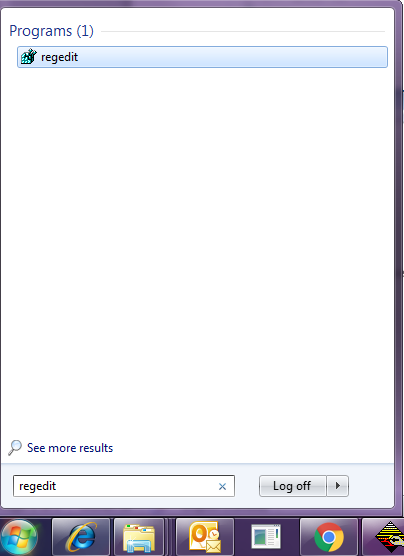
3. Look for HKEY_CURRENT_USER\Software\IntraHealth\Profile and click on Profile.

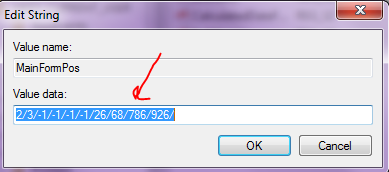
4. Double click on MainFormPos, delete the Value data and click OK.

5. Close regedit window.
6. Log in to EMR using VPP Applications folder. It should open up with proper screen size.
Citrix LAN Server Reset
If the user still cannot resolve the issue, a Citrix LAN Service reset may be needed. The Support Ticket (Service Now) should be redirected to the VPP-IMITS-Remote Apps group. The detailed content of the redirected ticket is documented in this article: Citrix LAN Server Reset