Issue: User reports that today's schedules are locked, they cannot schedule. When they add or edit a visit, the 'Ok' button is greyed out.
Cause: The timekeeper incorrectly extended the timekeeping period to include today's date.
How to confirm and resolve the issue:
Part 1:
- Navigate to Timekeeping > Periods
- Locate the current open timekeeping period for the team reporting the issue
- Richmond = RMD, example: 2020-07 Mar 06-19_RMD
- Vancouver West and North = VAN, example: 2020-07 Mar 06-19_VAN
- North Shore and Bella Coola = NS, example: 2020-07 Mar 06-19_NS
- Sea to Sky, Sunshine Coast and Powell River = CG, example: 2020-07 Mar 06-19_CG
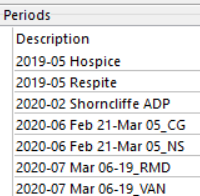
- Select and edit the appropriate timekeeping period
- View the 'To' date for the department
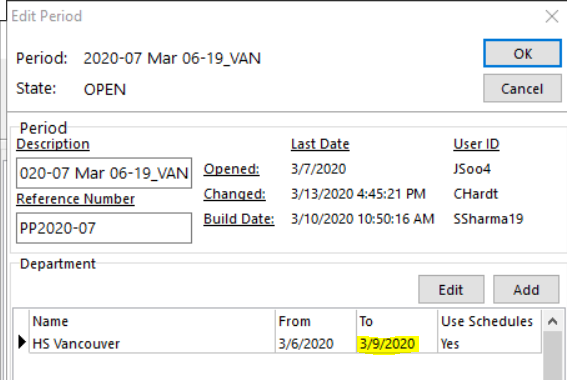
- If the 'To' date is today or later, edit the department and change the date as follows:
- Vancouver/Richmond: change date to yesterday
- STS/SC/PR/NS/BC (Coastal): 'To' date must be either the first or second Thursday in the pay period.
- IMPORTANT**Before changing the 'To' date for Coastal, you must check with the timekeeper to determine if they built timekeeping (or you can check if today's visits are visible in Adjust Timekeeping). If yes, then ALL visits for on the days built in error (i.e. today) must be unverified on each employee record in timekeeping prior to correcting the timekeeping period 'To' date. (Check with Sean or Christine for assistance with this)
- Note - if the 'To' date contains the correct date, then the timekeeper already corrected their error. The issue will be resolved with Part 2.
- Select OK to accept and exit 'Edit Period'
- Select X or Close to exit 'Add/Edit Periods'. (Do NOT select Close Period)
- Close the the Close
Part 2:
- Navigate to Maintenance > General Setup > Departments Module
- Select and edit the appropriate department
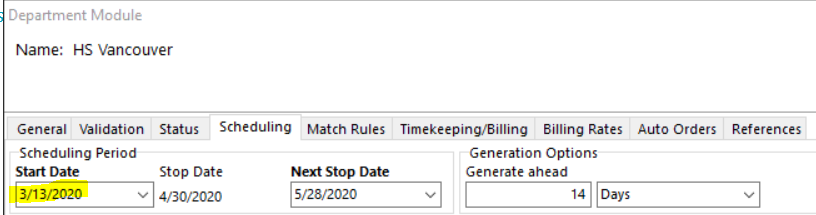
- Select the 'Scheduling' tab
- View the Scheduling Period Start Date and update as follows:
- For Vancouver/Richmond it should be set to today's date
- For Coastal (STS, SC, PR, NS) it should be set to either the 1st or 2nd Friday of the pay period, whichever is in the past.
- Select OK