User facing ImmsBC login details are located here:
Note - the above article does not mention Incognito mode
Incognito mode is used to help make sure information is not cached.
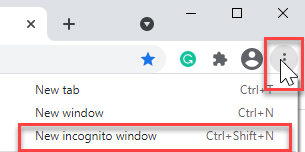
To launch incognito mode: Click on "Customize and control Google Chrome" on the top right corner of your browser and select "New incognito window".
If there are app launch issues:
- Validate that the computer is connected to Wi-Fi and on the VCH network.
- Validate the user is following the login steps listed on the front facing page.
-
See Access section above for user specific issues.