1. Client can print out all reports on default printer except for lab requisitions; they always go to the same printer – not her default.
a) Ask client to go to the report type that she has problems with, ask her to hold down shift key and press print icon
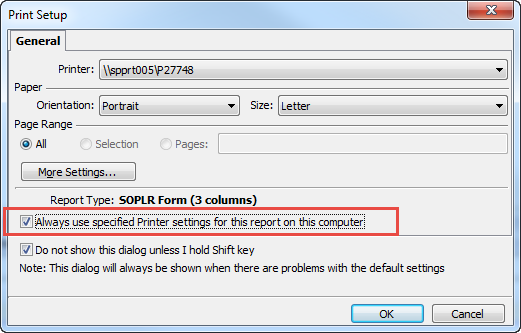
If the “Always use specified printer…” checkbox is checked, ask her to uncheck it
If it is not checked, go to b) but suggest as a workaround that she select her desired printer from the dropdown list and click the checkbox.
b) You need to go to the site and log into the workstation as this is workstation specific. Go to Organisation/Preferences/Printer and click on the Reports tab. Find the Report – it is the Report Type on the above dialogue window – and make sure this is set to Default. If it is not set to Default then set it to Default