When you see a Kanban board, you will see icons on the board, here is what they mean.
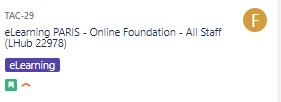
- The image below is how a Story (Issue)
 looks on the Kanban board
 - The eLearning category is an Epic - a way to group Stories together
- The gold F means this the Assignee is Agent F
|
Type |
Icon in Jira |
Note |
|
Bug |
 |
|
|
Epic |
|
Category - a way to categorize Stories |
|
Story |
|
CR |
|
Sub-Task |
 |
Linked to CR |
|
Task |
|
Tasks are Standards Orders when the Workstream is also Standard Order |


Related Articles