Problem
Users report that their client's Intervention Set was closed and they need it to be re-opened.
Users may also report that interventions are not added to the Intervention Set or the Notifications box. This also indicates that the Intervention Set was closed and needs to be reopened.
Solution
Note: This is a temporary solution as the issue should be fixed with 8.6 upgrade.
The Intervention Set was closed because the client record had previously been inactivated. If the Intervention Set needs to be re-opened.
There is a weekly reminder on Fridays for the support person to run a Stored Query that identifies these closed Recall Plans.
To re-open Recall Plans:
1. In Production environment, log in with SYS-ADMIN account into POS: Z- DO NOT USE - IMITS
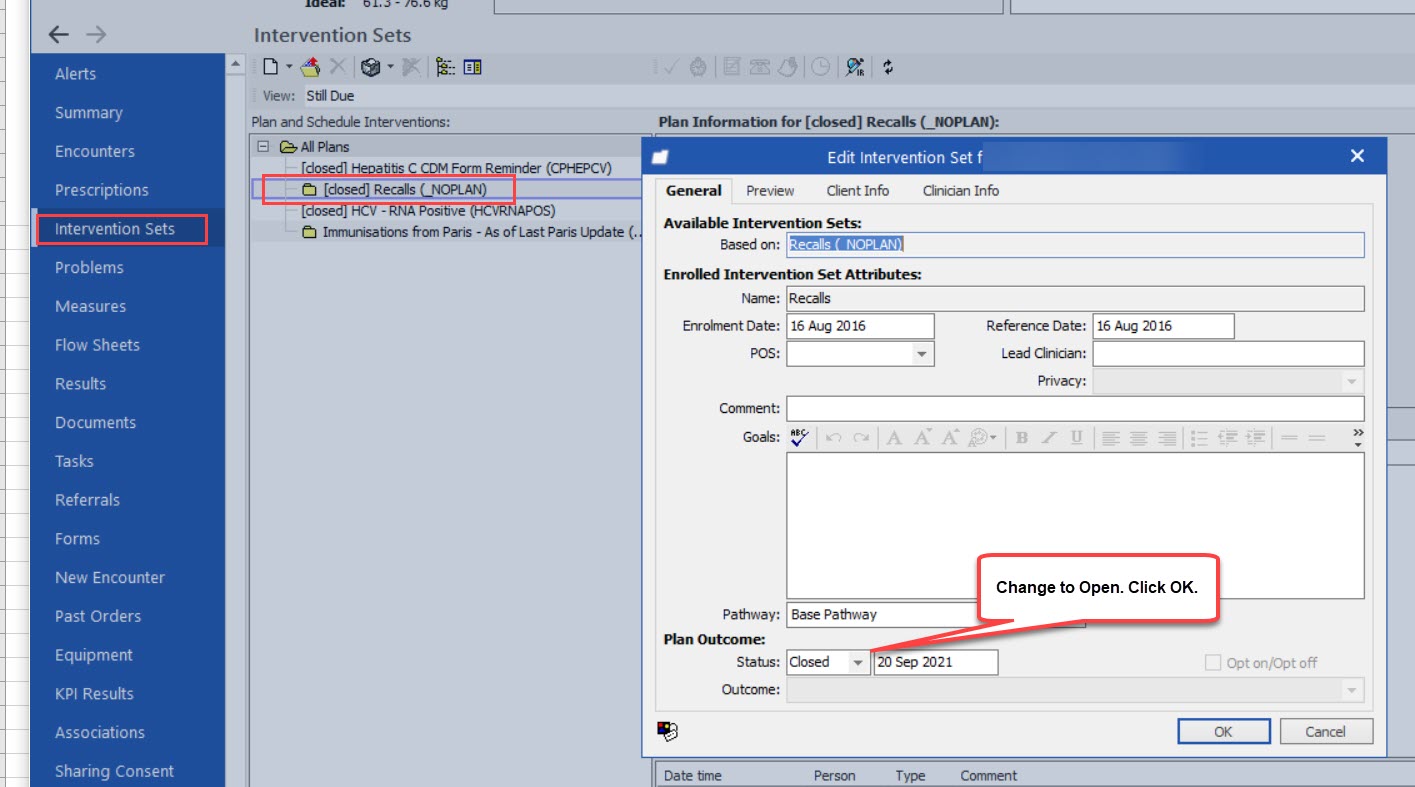
2. Go to Medical Record > Intervention Sets
3. Double-click on the closed Intervention Set (it will appear as [closed] Recalls (_NOPLAN))
4. Change the Status to Open
5. Click OK
6. If the Do you really want to set a reference date in the past? window appears, click Yes
7. Navigate to Encounters segment of the Medical Record
8. Find encounter note created under your SYS-ADMIN account and right-click Edit
10. Edit Encounter opens and in text, type in typing template code: ORECALL\
11. Typing template inserted: Closed recall plan was reopened.
12. Click Save

Reply
The Intervention Set has been reopened.