Background
Profile EMR Support Phone Number: 604-785-4124
Support Schedule
The Support Schedule is created quarterly and an email is sent to the team to announce when the schedule is available for the next quarter. At this time, it is recommended that you update your Outlook Calendar with your Support and Standard Order shifts.
Find EMR Support calendar in \\vch.ca\departments\PCCIS_DataShare\Team Administration\Team\Schedules\Support Schedule - 2022\2022 EMR Support Schedule.
Rules tab
Instructions for enrollment analyst to create support calendar.
Hours tab
Working hours of support staff.
On-call Schedule tab
Source of truth where support calendar is created from.
Calendar tab
Easy-to-read calendar view.
Counts tab
Total count of scheduled support shifts per support staff.
Email Address tab
Used for automated email notifications for support staff.
Day Support: Business Hours
Responsible for:
-
EMR Help emails:
- Hours: All emails received by EMRHelp during your work hours AND after work hours of previous-day-Support person (e.g., John's working hours are 7am-3pm and Mary's working hours are 9am-5pm. John worked Friday until 3pm. Mary is responsible for all emails received from 3:01pm on Friday until Mary's end of day at 5pm.)
- Support emails - dealt with by Day Support person (SNOW needs to be created)
- Standard orders - forward to and dealt with by Standard Order week person
- Change request via email or form - forward to and dealt with by Clinical Informatics
-
Service Desk emails:
- Hours: Same as EMR Help emails
- Click on SNOW link on email and check Status
- Open (not Resolved) and Assigned to Blank
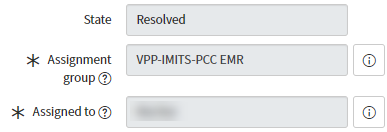
-
Service Desk calls:
- Hours: All calls received during your work hours (e.g., Mary's working hours are 9am-5pm. Mary is responsible for all Service Desk calls received between 9am-5pm.)
Beginning of shift tasks:
- Ensure the phone is transferred to you
- See Call Forwarding instructions: https://imitspccs.zendesk.com/hc/en-us/articles/360057231791-Access-and-Log-on-to-CISCO-Call-Forwarding-System
- Review all EMR Support emails and unassigned SNOW tickets
End of shift tasks:
- Ensure all EMR Support tickets are accounted for:
- Each support ticket has a corresponding ServiceNow ticket
- Each standard order has been taken by the SO person of the week who will create the corresponding JIRA ticket and complete the work item
- How to create a JIRA ticket
- Each non-support and non-SO work item (e.g., simple form and data requests) has been taken by Clinical Informatics who will create the corresponding JIRA ticket
-
Transfer phone to After Hours Support person
- Notify After Hours Support person that phone has been forwarded to them
Important! If you need to step away, it is your responsibility to find coverage.
Resources by priority:
- Internal and external Zendesk articles
- SO person of the week
- Daily team huddle
- Clinical Informatics for clinic workflow clarifications
After Hours Support: After Work and Before Work
Responsible for:
-
Service Desk calls: Follows Hours tab
- Related SNOW tickets are assigned to yourself and mark as Resolved as appropriate
Beginning of shift tasks:
- Ensure phone is turned on and not on Do Not Disturb
Important! If there is any EMR technical issue, contact SA on call at the following number: 604-842-2760
End of shift tasks:
-
Transfer phone to Day Support staff
- Notify Day Support person that phone has been forwarded to them
- Continue working on assigned unresolved SNOW tickets
- Report to EMRHelp or Daily Team Huddle if requires more information to resolve ticket
Standard Order (SO) Week
See Guidelines for Standard Order Requests.
EMRHelp Auto-Reply
Thank you for your email!
A member of the EMR team will get back to you with a response shortly.
Please note, EMR team business hours are Monday to Friday, 9 am to 5 pm.
If you contacted us outside of our business hours or on a statutory holiday, an EMR team member will respond on the next business day.
If urgent and you require assistance before the next business day, please contact Service Desk via phone at 604-875-4334 | 1-888-875-4334 and request for your call to be forwarded to the VPP-IMITS-PCC EMR On Call Support.
Links
EMR Support calendar \\vch.ca\departments\PCCIS_DataShare\Team Administration\Team\Schedules\Support Schedule - 2022\2022 EMR Support Schedule
SNOW https://healthbc.onelogin.com/portal
Call Forwarding https://imitspccs.zendesk.com/hc/en-us/articles/360057231791-Access-and-Log-on-to-CISCO-Call-Forwarding-System